@/Anchored
Notes that follow you
Scroll to enter ↓
Now in early access · v0.11.0 “Atlas” · Patent Pending

Notes that
follow you

Pick any open window and a note locks onto it — moving, resizing, hiding, following wherever it goes. Then Atlas, the private AI inside every note, reads what’s on that window and helps you with it — on your machine.

Get Early Access → See How It Works
Free · Windows 10/11 · one‑minute install, no account
main.py — Visual Studio Code
1def process_data(items):
2  result = load_config()
3  for item in items:
4    item.validate()
5    result.append(item)
6  return result
7
8# TODO: handle the empty-config case
NOTE
ATLAS
BI
🔗
main.py review
read the validate() flow
guard the empty-config case
add a unit test for process_data
ask Atlas what breaks if load_config fails
main.py

Your notes don’t know
where you work

Every sticky note app today is the same: free-floating windows with zero awareness of what you’re actually doing. You switch apps, your notes are left behind.

😵

Context Lost

Switch from VS Code to Chrome? Your notes stay behind. You spend more time hunting for notes than reading them.

👎

Manual Management

Move a window, reposition the note. Resize, reposition again. Minimize, forget where it was. It’s constant babysitting.

👀

No Memory

Close an app and reopen it? Your note has no idea which window it belonged to. The connection is gone.

Electron Bloat

Modern note apps eat 200–500MB of RAM and take seconds to start. For text on a screen. @/Anchored runs in ~50MB.

Three steps.
Zero friction.

No setup, no configuration, no learning curve. Open the Command Center, pick a window, done.

1

Pick a window

The Command Center lists your open windows. Click one — a note spawns anchored to it, labeled with its name.

2

It locks on

The accent edge glows. The note follows that window as it moves, resizes, minimizes, and comes back — across monitors.

3

Ask Atlas

Flip to the Atlas tab. It reads what’s on that window and answers — summarize, explain, draft, in context.

Anchored Text-aware Local Assistant System

A private AI that
sees your window

Every note carries Atlas — an assistant that reads the actual content of the window it’s anchored to, and helps with exactly what you’re looking at. Runs on a local model, or bring your own Ollama Cloud key for bigger ones.

NOTE
ATLAS
⚓ main.py local + cloud
Ask Atlas about this window — or use a quick action.
what’s wrong with this function?
process_data() returns result without checking it loaded — if load_config() fails it hands back None. Add a guard before the loop
in 412 · out 88
👁 See window
💡 Suggest
🎯 Control window
Ask Atlas… (Shift + Enter for a new line)
Local model
main.py
👁

Reads your window

Reads the window you’ve anchored it to — so it answers about the email, code, or page you’re actually on.

🔒

Local‑first & private

Runs a local model on your machine — offline, nothing sent anywhere. Add an Ollama Cloud key when you want a 600B‑class model.

Streams live, counts tokens

Answers type out token‑by‑token, with a live in/out token meter in the corner. No spinner, then a wall of text.

💡

Proactive suggestions

Flip on Suggest and Atlas watches the window as you work — when it spots a real issue, a theme‑colored lightbulb pulses. One quiet, high‑value nudge at a time, never a wall of noise.

🎯

Edits & operates the window

With your approval, Atlas acts on the window it’s anchored to — fixing its text or pressing its controls — scoped to that one window and previewed before every change. Clean up a draft, repair broken code, or drive an app like a calculator; it never touches anything else.

This is the actual app

Captured straight from @/Anchored running on Windows — v0.11.0, today. No marketing renders.

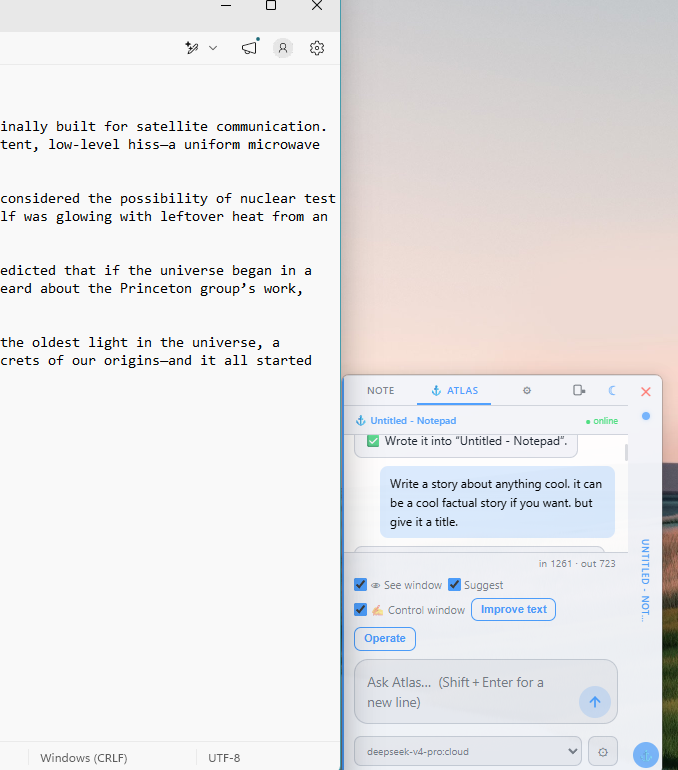
Atlas writing a full story into a Notepad window on command

It writes into your window

Ask Atlas to draft or fix something and — only after you approve — it writes straight into the window it’s anchored to. Here it drafted a whole story into Notepad.
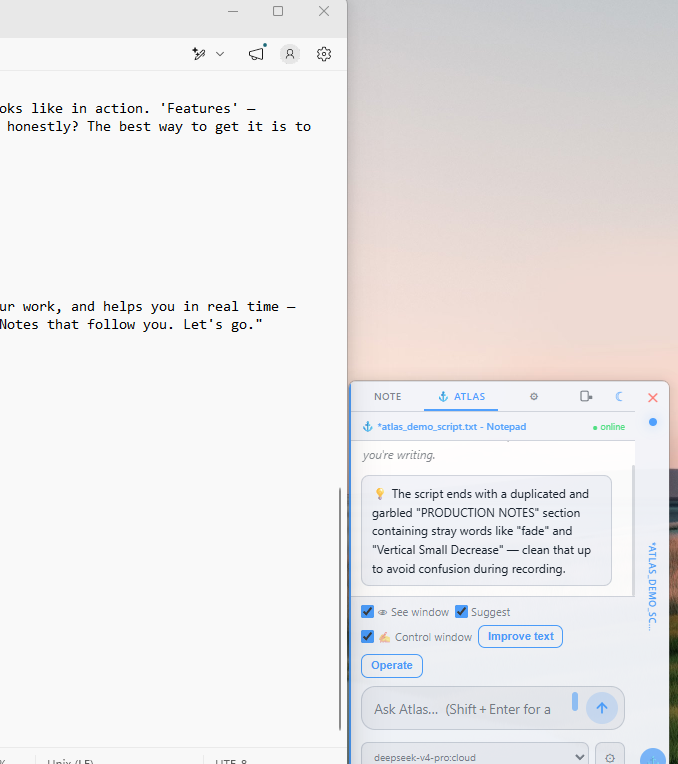
Atlas proactively flagging a garbled section in a script

It catches problems as you work

Switch on Suggest and Atlas quietly watches the window, flagging real issues — like the garbled section it caught in this script — without being asked.

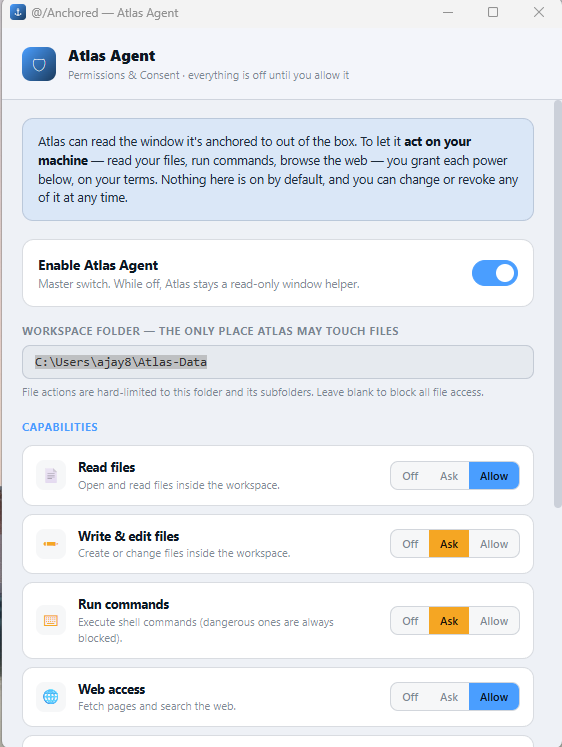
The Atlas Agent permissions panel, scoped to a folder you choose

Your machine, your rules

Everything past reading the window is off until you allow it. Each capability is set to Off, Ask, or Allow — revocable anytime, and scoped to a folder you choose.

⚓ Real screen captures from the shipping v0.11.0 build — control, proactive help, and consent, exactly as they run.

Six themes.
Light or dark.

Every note re‑skins instantly — pick a theme, flip light or dark, set a per‑note accent. These are the real palettes from the app.

Midnight#4a9eff
Foundry#f47920
Forest#5cb85c
Crimson#e04040
Magenta#b24fd8
Mono#888888
Light Dark Slide‑tab & bracket modes 🔢 Up to 6 notes / window

Everything your notes
should’ve always had

Native to Windows. Starts instantly. Sips RAM. No Electron, no bloat.

🔒

Persistent Memory

Notes remember their window by title. Close the app, reopen it — the note re‑anchors automatically, even waiting for a window that isn’t open yet.

💻

Multi-Monitor

Drag a window to another screen and the note follows seamlessly. Respects taskbars and work areas.

Native Performance

A native core does the anchoring. Starts fast, stays out of your way (~50MB).

🎨

Themes + Light/Dark

Midnight, Foundry, Forest, Crimson, Magenta, Mono — each in full light or dark, with per‑note accents.

🛡

Private by Default

Atlas runs on a local model — your window content and notes never leave your machine, unless you deliberately switch to the cloud.

💾

Auto-Save

Every keystroke saved instantly. No save button, no data loss. Local-first, atomic, and crash-safe.

🌐

Works With Everything

VS Code, Chrome, Excel, Notepad, games — if it has a window, @/Anchored can ride it. No app‑specific plugins.

🧮

Bring Your Own Model

Local Ollama out of the box. Point Atlas at Ollama Cloud or any compatible endpoint with a one‑time key — per‑model routing.

Not just another
notes app

@/Anchored isn’t competing with notes apps. It’s a new category: window companions with an AI that reads the window.

FeatureWindows Sticky NotesSideNotesZhorn Stickies@/Anchored
Attaches to windows
Follows window position
Works with ALL apps
Multi-monitor aware
Auto re-attach on reopen
Six notes per window
Native performance
Reads your window content (AI)
Private / on‑device AI

⚙ = partial/limited — Zhorn Stickies can “attach to program” (appear on top when active) but does NOT follow window position.

Where we’re headed

The best version of @/Anchored is the one you forget is there. Zero friction. Always where you need it.

Phase 1 — Foundation

Window Anchoring

Click‑to‑anchor, bracket & slide‑tab modes, persistent memory, multi‑monitor, auto‑save.

● Built
Phase 2 — Production

The Native Rewrite

Native Windows app, spring animations, proper typography, light & dark, system tray, six‑slot multi‑note per window.

● Built
Phase 3 — Intelligence

Atlas — Context‑Aware AI

Reads the anchored window (OCR + accessibility); local‑first or cloud; streaming answers + live token meter; proactively suggests; and — with your approval — edits its text and operates its controls, scoped to that one window.

● Built · v0.11.0
Phase 4 — Open

Bring Your Own Agent

Point Atlas at any Ollama‑compatible endpoint — your own local agent, a custom model, a private gateway. Per‑model routing, one‑time key.

● Building
Phase 5 — Sync

Cloud & Sharing

Optional sync via Dropbox/OneDrive. Share notes between @/Anchored users. Offline‑first, sync when connected.

● Planned
Plans & Pricing

Free core, Premium Atlas

Free — the full window‑anchoring note system. Premium — Atlas with your own local model or cloud key. Premium+ — hosted Atlas, zero setup.

● Planned

Ready for notes
that follow you?

@/Anchored is coming. Be first in line.

✅ You’re on the list — we’ll reach out at that address.

Prefer email? hello@at-anchored.com